- Published on
聊聊前端的路由方案
- Authors

- Name
- noodles
- 每个人的花期不同,不必在乎别人比你提前拥有
概要
本文主要梳理前端路由的实现方案,按照如下的逻辑进行梳理: 前置知识 => 路由方案现状 => 从源码的解读理解前端路由的实现过程
前置知识
history
| 方法(属性) | 含义 |
|---|---|
| history.length | 只读, 代表当前会话历史的长度 |
| history.state | 只读, 代表当前会话栈顶的state |
| history.go(number) history.forward() history.back() | 从当前会话加载特定的页面,会触发popstate事件 |
| pushState(state, title, url) | 在当前会话的添加一个新的记录(关联state) url参数需要保证同源策略 |
| replaceState(state, title, url) | 替换当前会话栈顶的记录(不会增加history长度,关联state) url参数需要保证同源策略 |
history相关事件
当用户触发浏览器动作或者js调用history.back/history.forward/history.go方法时,会触发popstate事件。
hash相关事件
- 当url片段标识符改变(#xxx), 会触发hashchange事件。
- 当设置与当前不同的hash片段的时候,会在当前会话中添加一个新的记录。
路由方案现状
| 方案 | 原理 | 优缺点 |
|---|---|---|
| 基于history实现的路由方案 | 使用history相关事件和方法完成路由的切换 | history可以设置同源下的任意url,需要注意与服务端结合的场景,防止出现404 |
| 基于hash实现的路由方案 | 使用hash相关事件完成路由的切换 | hash只能改变当前url的#,有局限性 |
从源码的了解路由的实现过程
以下源码分析了history路由的实现过程,源码涉及history, react-router.整体的实现逻辑如下
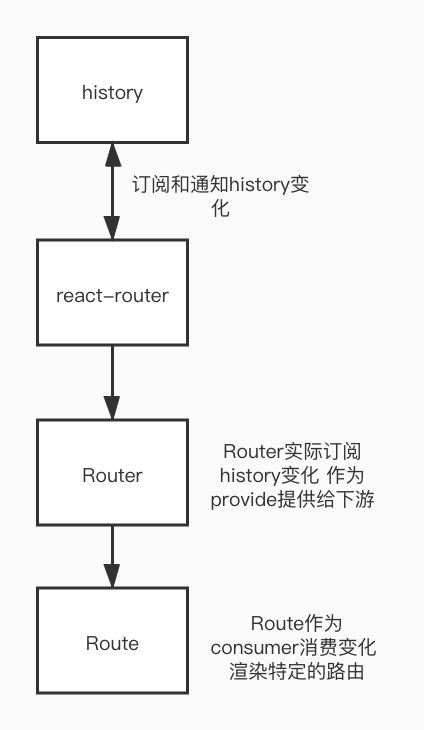
下面代码是在react项目中使用history路由实现的一个例子,它能实现根据特定的path来渲染对应的组件。
import './App.css'
import React from 'react'
import { BrowserRouter as Router, Switch, Route } from 'react-router-dom'
function App() {
  return (
    <Router>
      <Switch>
        <Route exact path="/">
          <div>home</div>
        </Route>
        <Route path="/about">
          <div>about</div>
        </Route>
        <Route path="/dashboard">
          <div>dashboard</div>
        </Route>
      </Switch>
    </Router>
  )
}
export default App
react-router/packages/react-router-dom/modules/BrowserRouter.js
import React from 'react'
import { Router } from 'react-router'
import { createBrowserHistory as createHistory } from 'history'

class BrowserRouter extends React.Component {
  history = createHistory(this.props)

  render() {
    // 初始化browser history 可以推断出路由的切换逻辑是history与Router结合的实现
    return <Router history={this.history} children={this.props.children} />
  }
}
export default BrowserRouter
packages/index.ts
    // 在最后执行跳转的时候 会执行所有的listen函数
    function applyTx(nextAction: Action) {
      action = nextAction;
      [index, location] = getIndexAndLocation();
      listeners.call({ action, location });
    }
    let history: BrowserHistory = {
      // 以下为主要的跳转函数,在实现跳转逻辑的时候都调用了applyT方法。
      push,
      replace,
      go,
      back() {
        go(-1);
      },
      forward() {
        go(1);
      },
      // listion方法用于增加路由切换的监听函数
      listen(listener) {
        return listeners.push(listener);
      },
      // block方法允许传入一个block函数,在路由跳转的时候会执行所有的blocker函数
      block(blocker) {
        let unblock = blockers.push(blocker);
        if (blockers.length === 1) {
          window.addEventListener(BeforeUnloadEventType, promptBeforeUnload);
        }
        return function() {
          unblock();
          if (!blockers.length) {
            window.removeEventListener(BeforeUnloadEventType, promptBeforeUnload);
          }
        };
      }
    };
    return history;
从上面history源码看出,history这个库主要是维护history的相关状态(state, location, hash)并且增加路由跳转的告知能力.
react-router/packages/react-router/modules/Router.js
import React from 'react'
import HistoryContext from './HistoryContext.js'
import RouterContext from './RouterContext.js'
class Router extends React.Component {
  static computeRootMatch(pathname) {
    return { path: '/', url: '/', params: {}, isExact: pathname === '/' }
  }
  constructor(props) {
    super(props)
    this.state = {
      location: props.history.location,
    }
    this._isMounted = false
    this._pendingLocation = null
    if (!props.staticContext) {
      // 这里订阅了history的变化并且在变化的之后更新location
      this.unlisten = props.history.listen((location) => {
        if (this._isMounted) {
          this.setState({ location })
        } else {
          this._pendingLocation = location
        }
      })
    }
  }
  componentDidMount() {
    this._isMounted = true
    if (this._pendingLocation) {
      this.setState({ location: this._pendingLocation })
    }
  }
  render() {
    return (
      // 将location作为context 在需要订阅的位置获取   Route消费location完成特定children的渲染。
      <RouterContext.Provider
        value={{
          history: this.props.history,
          location: this.state.location,
          match: Router.computeRootMatch(this.state.location.pathname),
          staticContext: this.props.staticContext,
        }}
      >
        <HistoryContext.Provider
          children={this.props.children || null}
          value={this.props.history}
        />
      </RouterContext.Provider>
    )
  }
}
export default Router